Instant, self-directed test fits or a 24-hour package? A fair comparison of laiout and qbiq.
Updated October 2026. This comparison reflects publicly available information as of 1 October 2026.
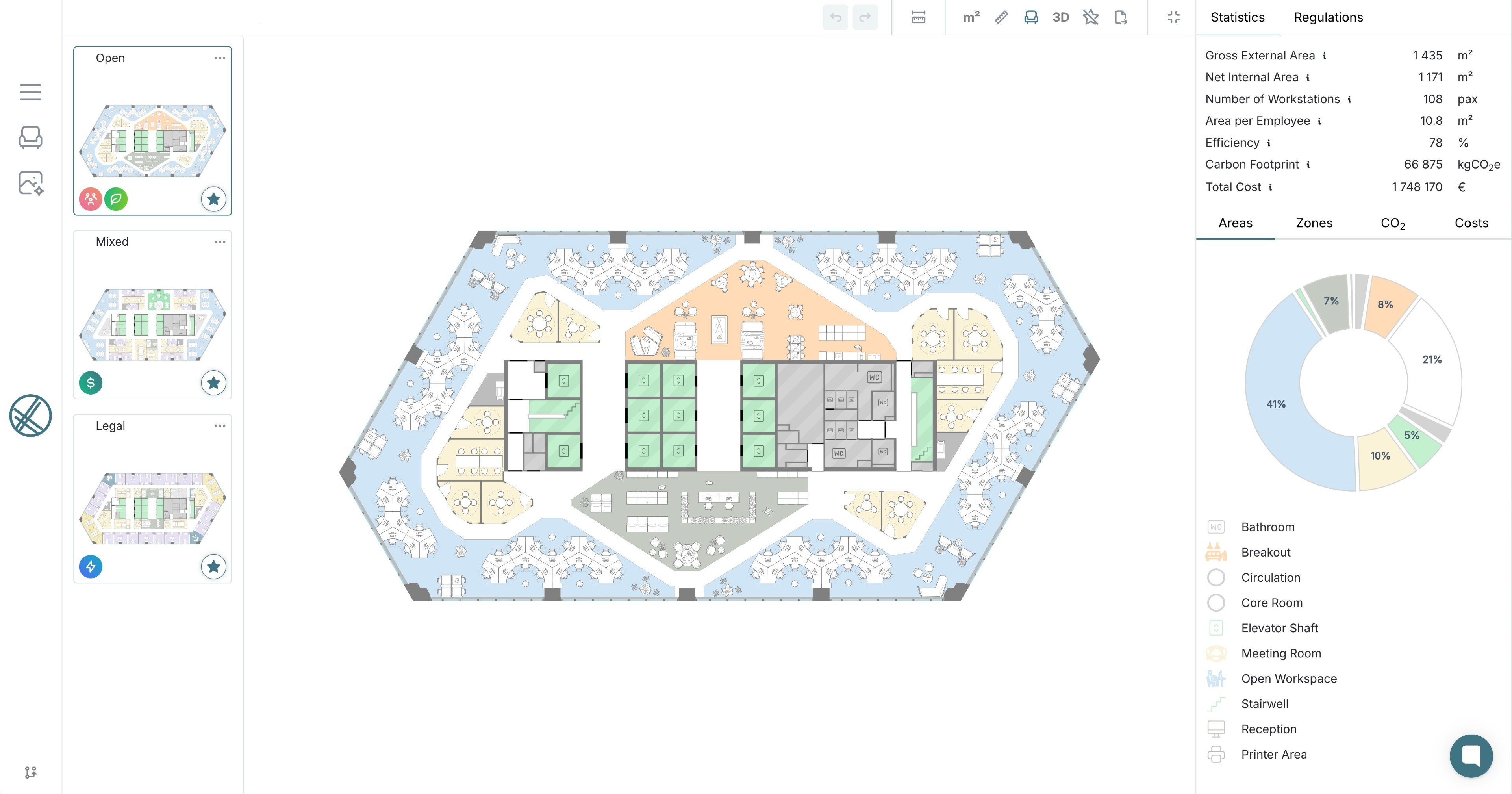
laiout is self-service AI test fit software that generates commercial office layouts in seconds, adjusts them live, exports them straight to Revit, CAD and PDF, and turns any design into AI static and video renders in seconds to minutes. qbiq returns, per its own materials, an architect-validated package with quantity take-offs within 24 hours. In our view, laiout is the stronger default for most deal teams, while qbiq fits when validation and take-offs matter more than speed.
- laiout and qbiq both replace a slow, architect-led test fit with software, and both deliver finished outputs including renders and Revit files, but on different terms. laiout generates, adjusts and exports instantly under your control, while qbiq states that it returns an architect-validated package within 24 hours.
- In our view, laiout is the stronger default for most deals, since instant, self-directed results keep a deal moving and the whole deal team can use them. qbiq is the better fit when an architect-validated package with quantity take-offs matters more than speed.
- qbiq also lists a Studio editor for refining a layout it has generated, with live metrics, so the useful question is which workflow each platform is built around from the start.
Traditionally, a simple office test fit takes days to weeks from brief to finished plan, even though the drafting itself is only a few hours of architect time for a single floor plate. Fees run from a few hundred to several thousand dollars, and test fit agreements commonly range from $0.12 to $0.15 per square foot. Both platforms exist to remove that bottleneck, but they do it on different terms.
- Both deliver, on different terms: laiout generates a test fit in seconds, exports it straight away to Revit, CAD and PDF and renders it as AI static images or video in seconds to minutes, so a landlord, broker or tenant can adjust and share it mid-conversation, while qbiq's package of renders, a virtual tour and Revit files is, per its own materials, delivered within 24 hours.
- Scope differs: qbiq assembles floor plans, rendered tours, quantity take-offs and Revit or CAD models into one architect-validated package, whereas laiout puts the whole workflow of generating, designing, reviewing, visualising and sharing in the user's hands, with capacity, cost and carbon data attached.
- Editing happens at different points: laiout generates the first layout live and lets you adjust it from there, while qbiq lists a Studio editor for refining a layout it has generated.
- Turnaround: laiout generates layouts in seconds, adjusts them live and exports straight away. qbiq lists 24 hours for its full package and for revisions.
- Output: laiout provides optimised test fits, AI static and video renders in seconds to minutes (a premium add-on), 3D walkthroughs and live capacity, cost and carbon metrics, with exports to DWG, DXF, RVT, IFC, OBJ, PDF and CSV. qbiq provides floor plans, rendered tours and images, quantity take-offs and Revit and CAD models.
- Verification: qbiq states that its packages are validated by in-house architects before delivery. laiout builds compliance checks into its layouts, and the person steering the plan keeps control of the result.
- Reach: laiout is used in 45+ countries. qbiq reports more than 100 countries in its 22 September 2026 announcement, with close to one billion square feet planned.
- Audience: laiout serves landlords, tenants, brokers, designers and flex operators on one platform. qbiq serves architects and construction teams, landlords, tenants and real estate service providers.
- Revisions cost seconds, not a day: Generate a test fit and adjust it with the client in the room, instead of waiting a day for each revised package. This is the same logic behind why speed wins in competitive leasing markets.
- Finished outputs are needed straight away: Export to DWG, DXF, RVT, IFC and OBJ the moment the layout is right, or use the laiout for Revit plugin to bring the chosen layout back as native, editable Revit elements. Generate AI static and video renders from the same design in seconds to minutes, ready to share.
- The whole deal team needs access: Landlords, tenants, brokers, designers and flex operators work from the same self-service platform, with onboarding typically completed in a single session first.
- Numbers need to move with the layout: Capacity, cost and carbon update as the plan changes, so trade-offs are visible while the conversation is still happening.
- You want a package assembled and validated for you: Floor plans, rendered tours, quantity take-offs and Revit models arrive together after validation by in-house architects, so there is nothing to assemble or check on your side.
- You want a materials inventory in the package: qbiq lists quantity take-offs, with an inventory of materials, as part of its package.
- A day's turnaround works for your process: For a pitch or RFP response due tomorrow, a complete 24-hour deliverable can be exactly right.
- When do you need the answer? If it has to happen in the meeting, laiout fits. If it is due for a pitch tomorrow, qbiq's 24-hour package fits.
- What do you want to receive? Renders within minutes, 3D walkthroughs and Revit-ready exports that you generate yourself point to laiout. An architect-validated package with quantity take-offs assembled for you points to qbiq.
- Who steers the plan? Anyone on the deal team, live, points to laiout. Validation by in-house architects before delivery, with refinement available afterwards in qbiq's Studio, points to qbiq.
Q: Is qbiq or laiout better for commercial office space planning?
In our view, laiout is the stronger overall choice for most deal teams, because instant, self-directed results with renders and Revit-ready exports keep a deal moving. qbiq suits moments that call for an architect-validated package, including quantity take-offs, assembled for you, when a day's wait is acceptable. Our guide to choosing AI test fit software sets out five criteria for weighing the two.
Q: Does qbiq work in real time the way laiout does?
Per its own materials, qbiq's package returns within 24 hours, and its Studio editor lets users refine a generated layout with live metrics. laiout generates the first layout itself live, in seconds.
Q: What are alternatives to qbiq for AI space planning?
The right alternative depends on the job. laiout is built for instant, self-service test fits that landlords, tenants, brokers, designers and flex operators generate, adjust and export themselves. Other platforms focus on different jobs, such as enterprise workplace programmes or converting existing floor plans into structured data, so it helps to start with the stage of the deal you need to support.
Q: Is qbiq or laiout better for brokers?
Brokers who need to answer a tenant brief during a tour or call lean towards laiout, since the layout and exports are ready immediately and renders follow within minutes, which is how brokers close deals faster with AI test fits. Brokers preparing an RFP response who want an architect-validated package with quantity take-offs, and can wait a day, may prefer qbiq. A broker can also use both.
Q: Does laiout export to Revit and CAD like qbiq?
Yes. laiout exports to DWG, DXF, RVT, IFC, OBJ, PDF and CSV straight away. qbiq goes a step further by assembling Revit models and quantity take-offs into a single package that it describes as architect-validated.
Q: Can a team use both laiout and qbiq?
Yes. A team can use laiout for the instant, self-directed test fit that keeps a deal moving, then use qbiq where an architect-validated package with quantity take-offs is wanted.
In our view, laiout is the stronger overall choice for most commercial leasing situations. It is instant, self-service, usable by the whole deal team, and puts live capacity, cost and carbon data and Revit-ready exports in your hands straight away, with AI static and video renders following in seconds to minutes. qbiq earns its place where architect validation and quantity take-offs are required and a day's turnaround is acceptable, and some teams will sensibly use both.
If the next step is a live conversation, book a demo with laiout today and see a test fit generated, adjusted and exported in front of you.
- laiout generates, adjusts and exports test fits instantly under the user's control, while qbiq states that it returns an architect-validated package within 24 hours.
- A traditional architect-led test fit can take days to weeks to turn around and can cost from a few hundred to several thousand dollars.
- qbiq's package includes rendered tours, quantity take-offs and Revit and CAD models, and it lists a Studio editor for refining layouts with live metrics.
- laiout adds live capacity, cost and carbon data, AI static and video renders, 3D walkthroughs and exports to DWG, DXF, RVT, IFC, OBJ, PDF and CSV.
- qbiq reports reach in more than 100 countries, against laiout's 45+.
- In our view, laiout is the stronger overall choice for most deals, and qbiq fits where architect validation and quantity take-offs matter more than speed.
- qbiq company announcement, PR Newswire, 22 September 2026.
- What Is a Test Fit in Commercial Real Estate? How Developers Use Them, Build, March 2026.
- Why Tenants Should Use A Test Fit, Park Real Estate Advisors.
Author: Theodore Harding, laiout
Get laiout News and Updates right in your inbox.

We're always open to hearing from talented people. If you don't see an open role that fits, send a speculative application to careers@laiout.co.Tell us what you'd bring and why laiout resonates with you.

Sign up to our newsletter


.svg)
.svg)


.svg)

