Generated test fits or a hand-built 3D plan? A fair comparison of laiout and Hypar for leasing teams.
Updated October 2026. This comparison reflects publicly available information as of 15 October 2026.
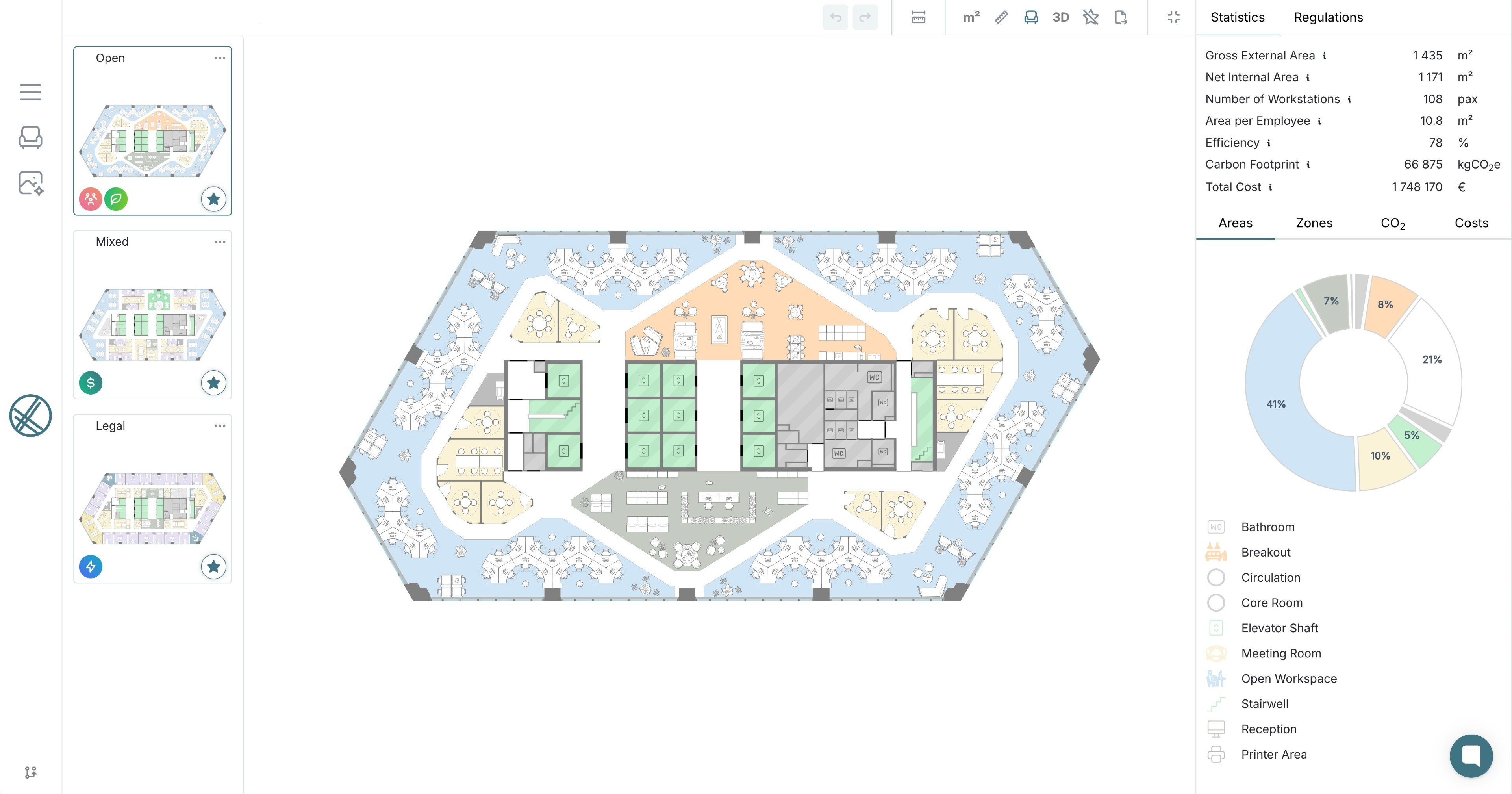
laiout is self-service AI test fit software that generates commercial office layouts in seconds, adjusts them live, exports them straight to Revit, CAD and PDF, and turns any design into AI static and video renders within minutes. Hypar is, per its own docs, a cloud space planning platform where architects and engineers build a layout against a client's space program and site, with live area metrics and export to Revit and Rhino. In our view, laiout is the stronger choice when a leasing or fit-out decision needs a layout now, while Hypar fits design teams that want to build up a detailed plan against a program in 3D.
- Hypar and laiout both give live feedback as a plan changes, but they start in different places. laiout generates optimised test fits in seconds for the person making a leasing decision, while Hypar's quick start has the designer place the building, draw spaces and circulation, and refine from there.
- In our view, laiout is the stronger choice for most leasing situations, since a generated layout, live cost, carbon and capacity data, and AI renders and videos within minutes are available from the first session. Hypar is the better fit for architects and engineers who want to develop a plan by hand against a detailed program.
- The platforms overlap on space planning, which is why they are compared, and design teams could reasonably use both.
Leasing slows down when a tenant brief has to wait for a plan. Traditionally, a simple office test fit takes days to weeks from brief to finished plan, even though the drafting itself is only a few hours of architect time for a single floor plate, which is one reason leasing cycles run long. Fees run from a few hundred to several thousand dollars, and test fit agreements commonly range from $0.12 to $0.15 per square foot. Hypar and laiout both aim to shorten the planning stage, from different starting points.
- Different starting points: laiout generates a test fit from the floor plan, while Hypar's docs describe building a layout by placing and shaping spaces against a program.
- Different audiences: Hypar's docs describe a platform for architects and engineers, whereas laiout serves landlords, tenants, brokers, designers and flex operators.
- Different destinations: Hypar is built around developing a plan in 3D before carrying it into Revit or Rhino, whereas laiout gets a decision-ready layout, renders and exports quickly, and also brings the chosen layout into Revit through its plugin.
- Built for: laiout serves landlords, tenants, brokers, designers and flex operators. Hypar describes itself as a platform for architects and engineers, per its own docs.
- Starting point: laiout generates optimised test fits in seconds and lets users adjust the plan live. Hypar's quick start has the user place a building, add spaces and circulation, and refine, per its own docs.
- Program and metrics: laiout shows cost, carbon and capacity live, updating on every adjustment to the plan or design. Hypar tracks net and gross area against a program that can be imported from a spreadsheet, per its own docs.
- Furnishing: Hypar offers layout suggestions for furniture within a space, per its own docs. laiout generates the layout and lets the user adjust it live.
- Getting started: laiout is self-service, with onboarding typically completed in a single session. Hypar offers a free plan and a quick start guide whose core path takes about 15 minutes, per its own docs.
- Visuals: laiout provides AI static and video renders within minutes (a premium add-on), plus 3D walkthroughs. Hypar offers 3D views and a diagram mode for client conversations, per its own docs.
- Sharing: laiout creates shared links to a design that stakeholders can open and review without a CAD licence. Hypar lets users invite teammates or clients as viewers or editors, per its own docs.
- Outputs and workflow: laiout exports to DWG, DXF, RVT, IFC, OBJ, PDF and CSV, and its Revit plugin brings the chosen layout back as native, editable Revit elements. Hypar exports to PDF, image, Excel, Revit and Rhino, per its own docs.
- Portfolio: laiout Hub stores a portfolio's floor plans and statistics in one place.
- A leasing decision is live: Generate a test fit and adjust it with the client in the room. This is the same logic behind why speed wins in competitive leasing markets.
- The user is not an architect: Landlords, tenants, brokers, designers and flex operators work from the same self-service platform, with onboarding typically completed in a single session.
- The first layout should not be built by hand: laiout generates the plan, so the conversation starts with options rather than an empty canvas.
- Capacity, cost and carbon sit beside every layout: laiout shows these metrics live and updates them on every adjustment to the plan or design, so trade-offs are visible during the conversation.
- Finished visuals are needed straight away: Generate AI static and video renders from the same design within minutes (a premium add-on), and share a link to the design with stakeholders who have no CAD licence.
- You are designing against a detailed program: Hypar imports a client program from a spreadsheet and tracks the design against targets live, per its own docs.
- You want to build the plan yourself in 3D: Hypar's quick start centres on placing spaces, circulation, doors and windows by hand, which suits designers who want full control from the first line. laiout also lets users adjust a generated layout live, so the difference is whether you start from a blank canvas or from options.
- You want to continue in Rhino as well as Revit: Hypar exports to both, per its own docs, and provides a Revit add-in, as reported by BIM Pure. laiout also exports to RVT and its Revit plugin brings the chosen layout back as native, editable Revit elements, so Revit teams are covered either way.
- You want to compare options inside one design project: Hypar lets users branch options, each with its own metrics, per its own docs.
- Who is planning? A landlord, broker, tenant or flex operator who needs a layout without a design team points to laiout. An architect or engineer developing a detailed plan points to Hypar.
- Where does the plan start? A generated test fit in seconds points to laiout. A program-led plan built space by space points to Hypar.
- What happens next? A leasing decision, a shared link, renders and exports point to laiout. Hand-building a plan against a detailed program, or continuing design development in Rhino, points to Hypar. Revit is covered by both.
Q: Is Hypar or laiout better for commercial office space planning?
In our view, laiout is the stronger choice for most commercial leasing situations, because it generates and adjusts test fits live in seconds, with cost and carbon data, renders and Revit-ready exports. Hypar suits architects and engineers who want to build a plan against a detailed program. Our guide to choosing an AI floor plan generator sets out how to weigh the options.
Q: Does Hypar generate test fits like laiout?
Hypar's docs describe a workflow where the user places spaces and circulation, with layout suggestions for furnishing each space, and the pages we reviewed do not describe generating a full floor layout automatically. laiout generates optimised test fits in seconds and lets the user adjust them live.
Q: What are alternatives to Hypar for space planning?
The right alternative depends on the job. laiout is built for instant, self-service test fits that landlords, tenants, brokers, designers and flex operators generate, adjust and export themselves. Other platforms focus on different jobs, such as enterprise workplace programmes, architecture-led design or building data, so it helps to start with the stage of the project you need to support. Our guide to AI test fit software covers five criteria for comparing them.
Q: Is Hypar or laiout better for architects and designers?
Designers who want a fast, defensible starting layout for a client lean towards laiout, which brings the chosen layout into Revit as native, editable elements. Architects who want to build a plan space by space against a detailed program may prefer Hypar, and a design team could use both.
Q: Does laiout work with Revit like Hypar?
Yes. laiout exports to RVT, and its Revit plugin brings the chosen layout back as native, editable Revit elements. It also exports to DWG, DXF, IFC, OBJ, PDF and CSV. Hypar exports to Revit and Rhino, per its own docs.
Q: Can laiout designs be shared with stakeholders who do not have CAD software?
Yes. laiout creates shared links to a design that stakeholders can open and review without a CAD licence. Hypar also lets users invite clients as viewers or editors, per its own docs, so sharing is a strength of both.
Q: Can a team use both laiout and Hypar?
Yes. A team can use laiout to generate and test options quickly during a leasing or briefing conversation, then use Hypar where an architect wants to develop a plan against a detailed program.
In our view, laiout is the stronger overall choice for most commercial leasing and fit-out decisions. It is live, self-service and usable by the whole deal team, and puts capacity, cost and carbon data and Revit-ready exports in your hands straight away, with AI static and video renders following within minutes. Hypar earns its place for architects and engineers who want to build a plan by hand against a detailed program, and some teams will sensibly use both.
If the next step is a live conversation, book a demo with laiout today and see a test fit generated, adjusted and exported in front of you.
- laiout generates and adjusts test fits live in seconds, while Hypar's docs describe building a plan by placing spaces and circulation against a program.
- A traditional architect-led test fit can take days to weeks to turn around and can cost from a few hundred to several thousand dollars.
- Hypar tracks areas against a program, offers furniture layout suggestions, and exports to PDF, image, Excel, Revit and Rhino, per its own docs.
- laiout adds live capacity, cost and carbon data, AI static and video renders, 3D walkthroughs and exports to DWG, DXF, RVT, IFC, OBJ, PDF and CSV.
- Both platforms share designs with clients, laiout by link and Hypar by inviting viewers or editors.
- In our view, laiout is the stronger choice for leasing and fit-out decisions, and Hypar for architects developing a detailed plan.
- What Is a Test Fit in Commercial Real Estate? How Developers Use Them, Build, March 2026.
- Why Tenants Should Use A Test Fit, Park Real Estate Advisors.
- Inside Hypar 2.0: The Future of Space Planning?, BIM Pure, 11 December 2024.
Author: Theodore Harding, laiout
Get laiout News and Updates right in your inbox.

We're always open to hearing from talented people. If you don't see an open role that fits, send a speculative application to careers@laiout.co.Tell us what you'd bring and why laiout resonates with you.

Sign up to our newsletter


.svg)
.svg)


.svg)

